Suppose we have a team that must get 30 or more product designs approved each day. Each design waits in an inbox. Each reply takes time. Some approvals are lost in long email threads. The result is slow production and late delivery. This is a real problem in the promotional product business. Many orders wait because artwork has not been approved. A slow approval can delay the entire process.
Today, companies are able to correct this issue. They have an automated artwork approval workflow for promotional products. This helps teams approve designs faster. It minimizes mistakes as well as wastage of time.
In this blog, you will understand that work becomes easier by automating artwork approvals. You will see real benefits and clear ways to do it for your business.
What Is Automated Artwork Approval?
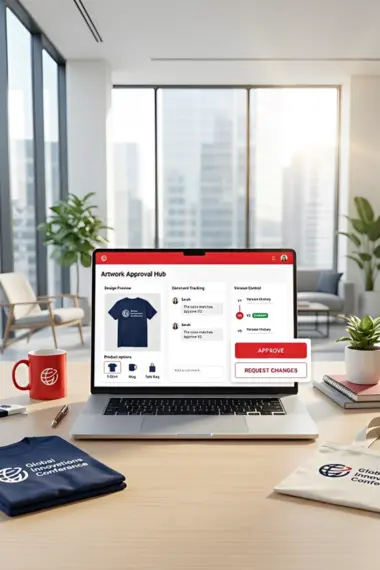
Before production starts, artwork approval requires a check and agreement. When this process is delayed, production is held up. An automated artwork approval workflow for promotional products moves this step online. It sends designs to clients and team members in one place. It tracks comments and changes then makes approvals faster and clearer.
Today, many businesses use promotional product design and approval software to manage this process. The right software keeps all artwork and approvals in one system. This reduces email delays and lost files.
Why Artwork Approval Is So Important
Artwork is the look of the finished product. Before printing a design or logo, it should be correct. When the design is not correct, the product is not correct.
Many problems can be created by a bad approval process:
• Production starts with the wrong design
• Reprints cost time and money
• The customer is unhappy
• Delivery is delayed
A fast approval process stops these issues before they start.
Real Life Example
A custom shirt company had many orders every week. Each shirt needed a logo and text update. Designs were sent back and forth by email. At 10 AM, a design was dispatched to one of the clients. Another change was needed. The next approval happened the next day. By that time, production stopped waiting for approval.
Then the company used an automated process. Designs were uploaded to one system. Clients saw designs on their phones. They approved or sent a message with changes right away. Now most designs are approved the same day. Production runs faster. Orders go out on time and customers are happier.
How Automation Helps the Artwork Workflow
Automating artwork approval makes work smooth. It removes confusion and saves time. It also stops mistakes before they happen.
Here are some benefits:
- Clients see designs in one place
- Teams track all comments
- Changes are easy to see
- Approvals happen faster
- Production starts sooner
This change helps the whole workflow. It keeps things systematically in a manner that was messy and disorderly.
Key Features to Look For
Good promotional product design and approval software should have the following:
| Feature | Benefit |
| Central design hub | All files in one place |
| Comment tracker | Shows all changes |
| Version control | Keeps old and new designs |
| Notification alerts | Reminds users to approve |
| Easy sharing | Clients approve on any device |
These features make artwork approval simple and fast.
How Software Changes Work
In the past, artwork approval was done by email. Important documents can be lost. Notes may be skipped. Teams waited for replies.
Now, modern platforms make this better. A company can send a design link. The client opens the link. They click to approve or comment. Everything is safe. All steps are tracked.
Tools like those explained in Smart Software Selection Guide for Growing Promotional Companies show how today’s software brings order to the design and approval process.
Also, tools that help with customer engagement include online approval systems. The blog Top Cloud Based Promotional Software for Better Customer Engagement in 2026 shows how cloud tools help clients and teams work smoothly in one place.
Best Practices for Faster Artwork Approval
The following tips will help you improve your process:
• Keep all artwork in one system
• Send clear instructions with each design
• Ask for feedback early
• Use software with alerts and tracking
• Review changes carefully before sending to the client
These steps ensure that approvals are fast and easy.
Key Points
• Slow approvals delay production
• Automated systems save time
• All artwork should be in one place
• Notifications help avoid missed replies
• Approval software keeps teams in sync
Conclusion
A major process in promotional products involves artwork approval. When this step is slow, production stops. Customers wait and businesses lose time.
This issue is solved by an automatic artwork approval process for promotional products. It simplifies approvals making them easy and quick. Using the promotional product design and approval software, teams can minimize errors and accelerate the production.
It brings order to a messy step. It makes both clients and teams happy.
To get approvals quicker and make production easier, visit the tools at: Swishtag
Their solutions enable you to store all artwork, comments and approvals in one place. It simplifies the approval of the design.
FAQs
Q: What is an automated artwork approval workflow?
It is an online system transmitting designs, changes and receipts.
Q: Why do artwork approvals take so long?
They take time when done with email and files get missed or delayed.
Q: What is promotional product design and approval software?
It is a tool that keeps the artwork and approvals in a single arranged location.
Q: How does automation speed up production?
Automation eliminates delays in emails, monitors changes and receives responses more quickly.
Q: Can clients approve artwork on their phones?
Yes, there are many systems of approval available on phones and tablets.
Q: Does automated approval reduce mistakes?
Yes. It stores all the changes and comments in a single place so nothing can be missed.
Q: How should I choose approval software?
Look for easy sharing, comment tracking, version control and alerts.