You cannot see the whole business at once.
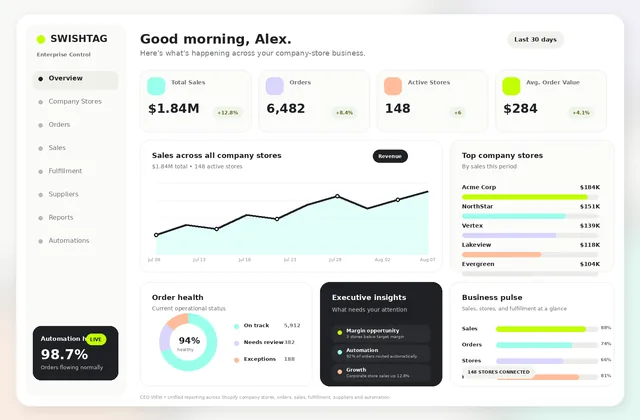
Orders and performance are spread across separate Shopify admins, so getting a clear portfolio view means logging into stores individually or rebuilding the same report outside Shopify.
Enterprise company store management + automation
One dashboard for every company store. Add automation only when it solves a real operational problem.
Built for large promotional distributors. Centralize orders and reporting first, then add the workflows your operation needs.
The multi-store problem
Large distributors rarely struggle to launch the next Shopify store. The pain comes later, when the operations team has to keep opening store after store to find orders, build reports, split supplier work, create POs, and answer enterprise client requests.
Orders and performance are spread across separate Shopify admins, so getting a clear portfolio view means logging into stores individually or rebuilding the same report outside Shopify.
People still split orders by supplier, create purchase orders, enter supplier orders, decide the decorator path, and chase the next step manually.
One needs PunchOut. Another needs a supplier connection. Another has a unique routing or approval rule. Off-the-shelf apps stop fitting once the workflow gets specific.
The better approach
Start with the base platform
If your biggest problem is simply managing many stores, start here. Bring your Shopify company stores into one control layer so your team can see the portfolio without living inside separate Shopify admins.
Then add only what you need →Give operations one central order view across multiple client programs instead of making people jump between Shopify stores just to see what came in.
See reporting across the company store portfolio, then drill into individual stores when a client, account manager, or operations team needs the detail.
Your portfolio can include simple Shopify company stores and SAGE-powered Shopify stores. The platform gives you a common operational view while each store keeps the setup it needs.
You do not have to buy a full automation project. Use the base platform for centralized management, then add workflow automation only when the operational return makes sense.
Base platform + optional add-ons
Start with centralized company-store control. Then add workflow automation, integrations, procurement, AI, or custom logic only when it solves a real business problem.
Centralize orders, reporting, store visibility, and operational status across your Shopify company-store portfolio. Use the base platform by itself if that solves the problem.
No forced bundle. Pick one add-on, combine several, or run the base platform without any of them.
Automate the repetitive work after an order arrives. Split orders by supplier, generate POs, submit supplier orders, route work to decorators, and flag exceptions.
Connect directly with approved suppliers when they provide suitable APIs or technical access. Automate product data, order submission, status updates, or another agreed workflow.
Use PromoStandards endpoints to connect supported supplier product, pricing, inventory, order, or status data into the workflow your stores need.
Enable procurement-connected company stores when enterprise buyers need PunchOut. Scope the cXML session, cart return, authentication, PO flow, and buyer-system testing.
Push clean commerce data into the finance or ERP system instead of recreating the transaction downstream. Integrations can be scoped for QuickBooks, Sage Intacct, NetSuite, or another practical API.
Add AI where it creates a measurable operational or customer benefit. That can include OpenAI workflows, chatbots, calling agents, recommendation engines, or internal assistants.
Have a workflow nobody else solves well? Show us how your business operates. If there is a practical technical path, we can build the missing integration, dashboard, approval flow, internal tool, or automation layer.
Integrations are validated before scope is confirmed. API access, documentation, permissions, licensing, data quality, security requirements, and third-party limitations can affect what is practical.
Example OMS-style workflow
This is one example of what the automation add-on can do. Your rules can be different. The point is to remove the repetitive decisions and copying your operations team performs on every order.
Orders from multiple Shopify company stores arrive in the central platform.
The workflow identifies the approved supplier, store rules, products, and required downstream path.
If one Shopify order contains products from multiple approved suppliers, the workflow can separate the work automatically.
Purchase-order data can be generated and the supplier order can be submitted through the connected supplier API.
The order follows the decorator or fulfillment path configured for that supplier, product, store, or decoration requirement.
Orders across all stores stay visible in one place, including flows that need human review.
Supplier order submission, status synchronization, and decorator automation depend on the APIs and technical access provided by each partner.
Integration layer
The goal is not to replace useful software. It is to stop your team from moving the same information by hand between stores, suppliers, finance systems, procurement tools, and customer-facing experiences.
Show us the workflow. If the software provides a usable API, webhook, file exchange, database, or other practical integration path, we can assess a custom connection.
Customer story · Club Colors
A long-term commerce and automation partnership supporting a complex promotional products operation at scale.
We’ve worked with Swishtag for several years, and they’ve become a key part of our team. They’ve helped us build enterprise level commerce workflows that support our business, and their work has been consistently reliable and high quality.
What stands out most is that they don’t just execute. They think critically, offer helpful suggestions, and speak up when something could be improved.
At this point, we truly see Swishtag as an extension of our own team, and their contributions have been invaluable.
How to start
You do not need a finished technical specification. Bring us the real workflow, the stores involved, and the manual work your team keeps repeating. We map it, prioritize it, and build around the business return.
We review your stores, teams, suppliers, decorators, systems, reporting, and the steps people perform manually today.
We separate annoying work from expensive work and identify the workflow where automation can save the most time or protect the most margin.
We establish the shared store, order, and reporting visibility your team needs so the operation has one reliable place to work from.
We build the selected workflow, such as order routing, POs, supplier connections, PunchOut, accounting sync, AI, or custom logic.
Once the first automation proves useful, we use the operational data to refine the workflow and decide what should be automated next.
Start where manual work is costing the most time, margin, or visibility. Then turn the first workflow improvement into a measurable operational win.
Reduce repetitive labor, operational leakage, and expensive handoffs as the number of stores and orders grows.
Move data, split orders, create downstream actions, and route work automatically where the workflow is repeating every day.
Free your account and operations teams from copying information and chasing routine steps across multiple company stores.
Use one dashboard and shared reporting to understand performance, issues, and opportunities across the full company-store portfolio.
Frequently asked questions
Start with the platform. Add the complexity only when it solves a real operational problem.
Automate My Company→The base platform gives your team one place to see and manage multiple Shopify company stores, including centralized order visibility, store-level reporting, portfolio reporting, and operational status. You can use it without buying workflow automation.
Yes. The centralized platform can be designed around a portfolio that includes SAGE-powered Shopify company stores and simpler Shopify company stores, based on the data and controls available in each setup.
Our promotional products data connections are built around SAGE and PromoStandards. We can also assess direct custom connections with individual suppliers when suitable APIs or technical access are available.
Yes. If a supplier provides suitable API access, we can build a custom connection for product data, order submission, purchase orders, status updates, or another agreed workflow.
A Shopify order can enter the middleware, be checked against your rules, split by approved supplier, converted into supplier POs or API orders, routed to the correct decorator or fulfillment path, and monitored from the central dashboard.
Yes. PunchOut is an optional paid capability. Add it when a corporate client requires a procurement-connected company store. We validate the buyer system, cXML flow, authentication, cart return, purchase-order requirements, and testing process before confirming scope.
Yes. If your distributor operation has a workflow that does not fit an off-the-shelf app, we can map the process and build a custom automation layer where the required systems provide suitable technical access.
Yes, these can be scoped as paid finance or ERP integration add-ons, subject to API access, account permissions, required data mappings, licensing, and technical review. We can also assess other accounting or ERP platforms when a practical integration path is available.
Yes. Custom add-ons can include OpenAI-powered workflows, customer chatbots, AI calling agents, recommendation engines, internal assistants, and other automation ideas. The final scope depends on the business workflow, data access, privacy requirements, and available APIs.
Ready to simplify the operation?
Show us how your stores, suppliers, decorators, finance systems, and client requirements work today. We will separate what belongs in the base platform from what is actually worth automating.