
Every year, thousands of ecommerce brands migrate to Shopify chasing better performance, a cleaner admin, and a stronger app ecosystem. Most of them also lose organic traffic in the process, not because Shopify is bad for SEO, but because a Shopify SEO migration is far more technical than “install an app and hit go.”
This guide walks through how you can transfer your website to shopify and what actually protects your rankings, and where most DIY approaches quietly fall apart.
You might be looking for:
How Much Does Shopify Migration Cost? (2026 Guide)
5 Best Shopify Migration Agencies in USA 2026
What Is Shopify SEO Migration, and Why Does It Go Wrong?

A Shopify SEO migration is the process of moving an existing store to Shopify while preserving the search signals search engines already associate with your site: URL structure, metadata, internal links, and backlink equity. It goes wrong for a simple reason.
Shopify uses a fixed URL structure (/products/, /collections/, /blogs/news/), and almost no platform you’re migrating from uses that same structure.
Every changed URL is a broken connection between your old rankings and your new pages unless it’s deliberately redirected.
What Does a Shopify SEO Migration Checklist Actually Include?

At a minimum, a proper SEO site migration checklist covers:
- A full crawl and export of your existing site (URLs, metadata, structured data) before anything changes
- A one-to-one URL mapping spreadsheet: old URL to new Shopify URL
- 301 redirects for every product, collection, and blog URL
- Metadata transfer, since Shopify frequently resets title tags and meta descriptions on import
- A Google Search Console update and sitemap resubmission
- Post-launch crawl and monitoring for 404s and indexing errors
This is the baseline. Almost every Shopify SEO migration guide online covers this list in some form. What separates a smooth migration from a traffic disaster is what happens in the parts most checklists skip entirely.
Does the Platform You’re Migrating From Change Your Redirect Strategy?
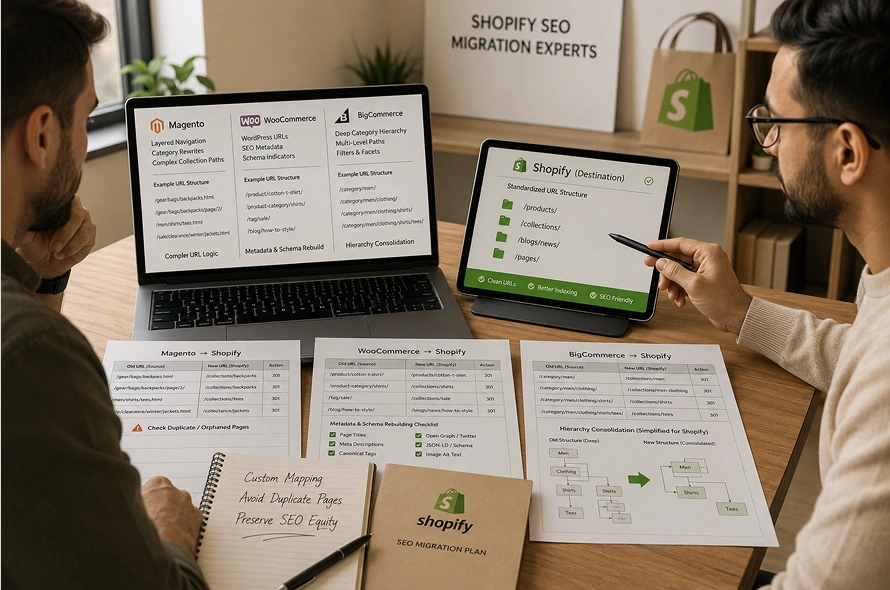
Yes, significantly, and this is where generic checklists fall short. Your old platform’s URL logic determines exactly how complex your redirect mapping needs to be.
- Magento to Shopify: Magento’s category URL rewrites and layered navigation URLs don’t map cleanly to Shopify collections. Getting this wrong creates duplicate or orphaned collection pages.
- WooCommerce to Shopify: WordPress sites often carry years of Yoast SEO metadata and schema markup that needs to be manually rebuilt in Shopify, since it doesn’t transfer automatically.
- BigCommerce or Salesforce Commerce Cloud to Shopify: These platforms often use deeper category nesting than Shopify supports natively, requiring a redirect strategy that consolidates or restructures URLs rather than mapping them one to one.
A generic redirect spreadsheet doesn’t account for any of this. It requires someone who’s actually handled that specific platform transition before.
Does an Automated Migration Tool Protect Your SEO, or Just Your Data?
This is the question most store owners never think to ask.
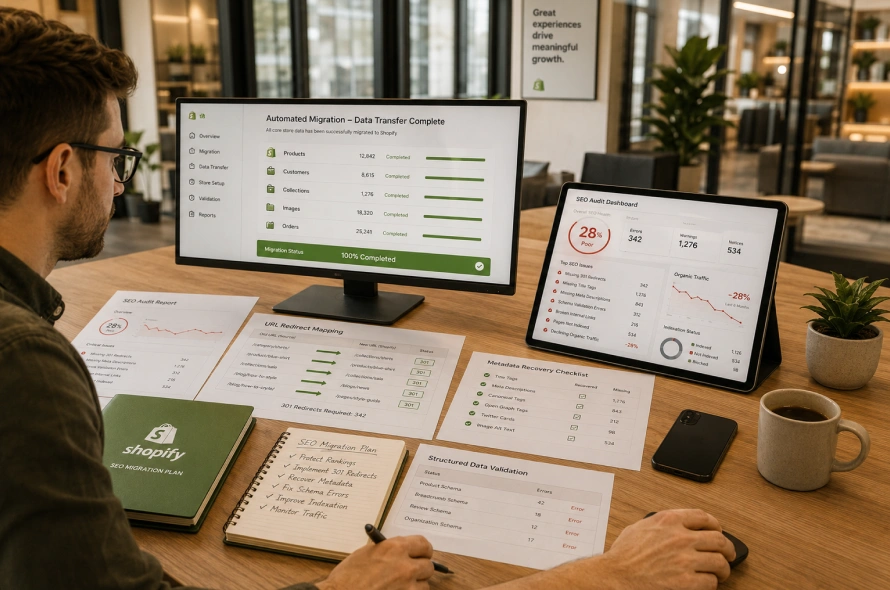
App-based migration tools are genuinely useful for moving products, customers, and order history quickly and cheaply. What they don’t do is protect your SEO.
These tools move data. They don’t audit your existing rankings, build a redirect strategy based on page authority, rebuild lost metadata, or validate structured data on the other side.
That gap is exactly where most DIY migrations quietly lose 20 to 40% of their organic traffic in the following months, not because the data didn’t transfer, but because the SEO layer around that data was never handled at all.
If your store has meaningful organic traffic, running a data migration tool without a parallel SEO strategy is one of the most expensive mistakes you can make, since recovering lost rankings takes far longer than protecting them would have.
How to Choose a Shopify Migration Agency (2026 Guide)
What Do Most Checklists Miss? Schema and AI Search Readiness
Two things almost no Shopify SEO migration guide addresses in depth:
Structured data. Shopify themes frequently ship with outdated or misconfigured schema markup, especially for product reviews, pricing, and availability. If your old site had rich snippets in search results, and your new Shopify theme doesn’t carry an equivalent schema, you can lose those snippets even if your rankings hold steady.
AI search visibility. Search has moved beyond traditional rankings. Google’s AI Overviews and other generative search features now pull directly from structured, well-organized product and content pages. A migration that only chases traditional keyword rankings, without considering how AI search tools parse your new site, is optimizing for half the picture in 2026.
How Long Does SEO Recovery Take After a Shopify Migration?

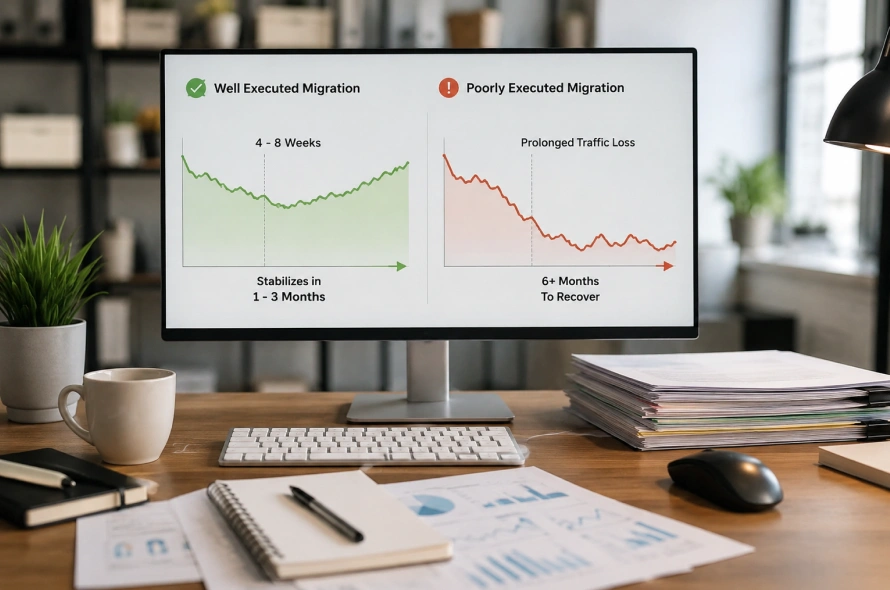
For a well-executed migration, expect some fluctuation for 4 to 8 weeks as Google recrawls and reindexes your site. Smaller stores often stabilize within one to three months. Larger, high-traffic stores with thousands of pages can take longer, particularly if redirect mapping wasn’t handled with page-level precision.
A poorly executed migration, on the other hand, can mean a prolonged 30 to 40% traffic drop that takes six months or more to recover, if it recovers at all.
Should You Hire a Shopify SEO Migration Specialist?

Given everything above, the honest answer for most stores with real organic traffic is ”YES”.
A specialist doesn’t just run your redirects. They audit your existing site before anything moves, build a platform-specific redirect strategy instead of a generic one, rebuild your metadata and schema by hand, and monitor your rankings closely through the recovery window instead of hoping for the best.
This is exactly the gap Swishtag’s Shopify migration service is built to close.
As a certified Shopify and Shopify Plus partner, Swishtag’s team handles the technical SEO work that DIY tools skip entirely: platform-specific redirect mapping, metadata and schema recovery, and post-launch monitoring, so your migration protects the rankings you’ve already earned instead of gambling them on an automated import.
If you’re planning a migration and want it done right the first time, explore Swishtag’s Shopify migration services before you commit to a DIY tool.
c
1. Is Shopify bad for SEO migration? No. Shopify has strong SEO fundamentals out of the box, including fast hosting and auto-generated sitemaps. Ranking drops during migration come from unhandled redirects and metadata loss, not the platform itself.
2. How long does a Shopify SEO migration take? The technical migration itself can take anywhere from a few weeks to a few months depending on store size, while SEO recovery afterward typically takes 4 to 8 weeks for stabilization.
3. Can I use an automated tool like LitExtension or Cart2Cart and still protect my SEO? You can use these tools for data transfer, but they don’t handle SEO redirect mapping, metadata rebuilding, or schema validation. You’ll still need a separate SEO strategy alongside the tool.
4. What’s the biggest SEO mistake during a Shopify migration? Redesigning the site and migrating platforms at the same time. Changing too many variables at once makes it impossible to diagnose what caused a ranking drop.
5. Do I need a Shopify SEO migration specialist, or can my developer handle it? A developer can handle the technical build, but SEO migration requires someone who understands redirect prioritization, metadata recovery, and platform-specific URL logic, skills a specialist brings that a general developer often doesn’t.
Final Words – Shopify SEO Migration Guide
A Shopify SEO migration is entirely survivable, and often a genuine upgrade, when it’s handled by someone who understands both Shopify and the SEO risks specific to the platform you’re leaving.
Generic checklists and automated tools can move your data, but they can’t protect the rankings, traffic, and revenue you’ve spent years building.
If you want your migration handled by a certified Shopify Plus partner instead of left to chance, visit Swishtag’s Shopify migration page to see how a properly managed migration protects your search visibility from day one.