Etsy is a great starting point for creative sellers, print shops, and small product brands. It gives you marketplace visibility, built-in buyers, and an easy way to start selling without building a full website from scratch.
But once your print shop starts growing, Etsy can become limiting.
You are paying marketplace fees, competing beside similar sellers, working inside Etsy’s rules, and depending on a platform you do not fully control. For a print-on-demand business, custom apparel store, or promotional products distributor, this creates a serious problem.
You may have products, customers, and repeat buyers, but you do not fully own the business infrastructure behind them.
That is why many print shop owners and promotional product distributors start moving from Etsy to Shopify.
Shopify gives you more control over your brand, customer experience, product structure, checkout, automation, email marketing, SEO, and fulfillment workflows. But migration is not just about exporting a CSV file and uploading it somewhere else.
If the migration is done incorrectly, you can lose product data, break product variations, damage SEO rankings, disconnect print providers, lose order history, and confuse returning customers.
This guide explains the real problem, what can and cannot be migrated, how the Etsy to Shopify migration process works, and why a professional Shopify migration team should handle it if your store has complex products, POD workflows, or existing organic traffic.
You might be interested in:
Migrate WooCommerce Print Shop to Shopify with 5 Steps
Squarespace vs Shopify for Custom Print Shops: Why It’s Time to Move
Why Print Shops Are Moving from Etsy to Shopify
The biggest issue with Etsy is control.
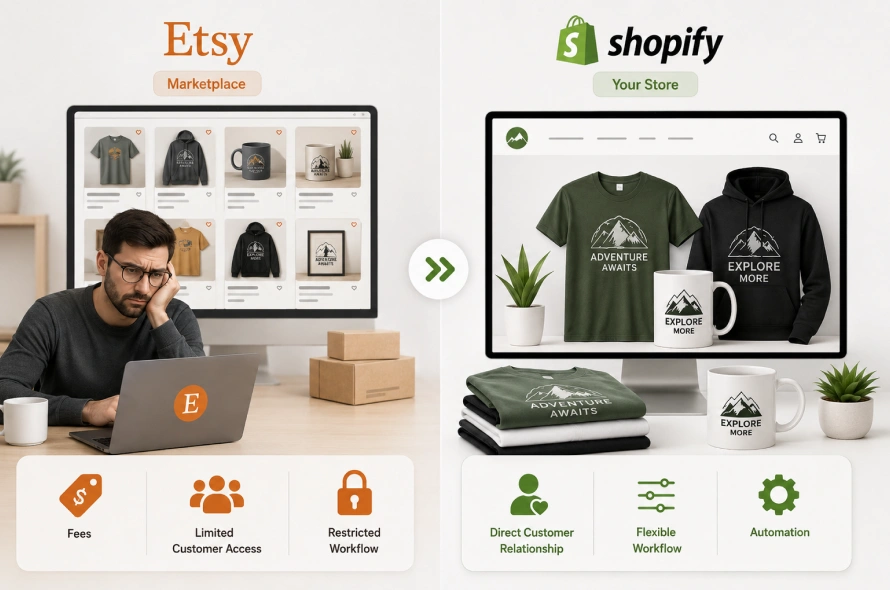
When you sell on Etsy, your store is built inside someone else’s marketplace. You can sell there, but you do not control the full customer journey. Etsy controls the platform rules, search algorithm, marketplace policies, buyer experience, and many parts of the customer relationship.
For a hobby seller, this may be manageable.
For a serious print shop, POD business, or promotional products distributor, it becomes risky.
1. You Do Not Fully Own the Customer Relationship
On Shopify, customers buy directly from your brand. You can build your own email list, create loyalty campaigns, run retargeting ads, and improve the customer journey over time.
On Etsy, customer data and communication are more restricted. You need to follow Etsy’s rules and privacy laws when communicating with past buyers.
This matters because repeat customers are one of the most valuable assets in a print business. If you cannot properly build long-term customer relationships, you are always dependent on marketplace traffic.
2. Fees Can Reduce Your Profit Margins
Etsy charges different types of fees, including listing fees, transaction fees, payment processing fees, and in some cases Offsite Ads fees.
For low-margin print-on-demand products, these charges can quickly reduce profit. This becomes more painful when you are selling apparel, promotional products, or custom merchandise where production, shipping, design work, and revisions already affect your margins.
Shopify also has platform and payment costs, but the difference is that you are investing into your own store, your own brand, and your own sales system.
3. Your Brand Looks Like One Store Among Many
Etsy is built as a marketplace. That means buyers often compare your products with dozens of similar listings.
On Shopify, you can create a branded storefront that feels more professional, premium, and trustworthy. This is especially important if you sell to corporate clients, teams, schools, events, or businesses that expect a proper branded experience.
4. POD and Promotional Product Workflows Need More Flexibility
Print businesses often need:
- Product variants
- Size and color options
- Print file handling
- Supplier mapping
- SKU structure
- Custom product fields
- Bulk ordering
- Client-specific collections
- Shipping rules
- Automated fulfillment
Etsy is not built for advanced operational workflows. Shopify gives you more room to build a proper ecommerce system around your products.
What Actually Transfers from Etsy to Shopify?
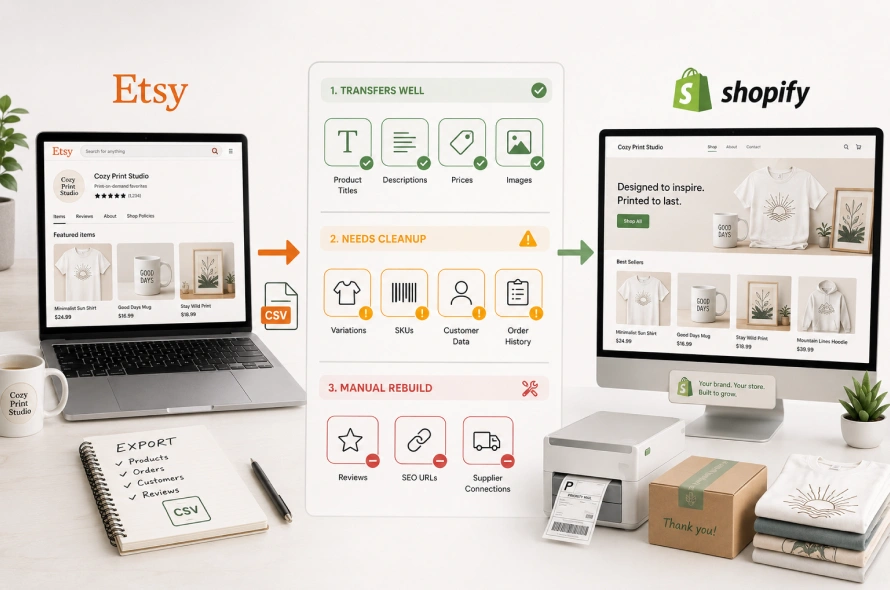
Before starting the migration, you need to understand what transfers easily and what needs manual cleanup.
A common mistake is assuming Etsy and Shopify store data work the same way. They do not.
Etsy is a marketplace. Shopify is a standalone ecommerce platform. Their product, customer, order, URL, and variation structures are different.
Here is what usually happens during migration:
| Data Type | Can It Transfer? | What Needs Attention |
| Product titles | Yes | Formatting may need cleanup |
| Product descriptions | Yes | Descriptions may need HTML formatting for Shopify |
| Product prices | Yes | Currency, taxes, and discount logic may need review |
| Product images | Usually yes | Image quality and file links should be checked |
| Product variations | Partial | Size, color, material, and other options may need restructuring |
| SKUs | Only if available | Missing SKUs must be created before POD automation |
| Customer data | Limited | Must follow privacy rules and marketing consent requirements |
| Order history | Partial | Historical order records may need manual or custom import |
| Reviews | Not directly through standard export | May require approved apps, manual handling, or custom review migration where allowed |
| SEO URLs | No direct match | Redirects must be created to protect organic traffic |
| Supplier connections | No | Printful, Printify, or other supplier connections must be reconnected |
The important point is simple:
Your Etsy data can be moved, but it must be cleaned, mapped, and rebuilt properly for Shopify.
The Biggest Migration Problem: Product Variations and SKUs
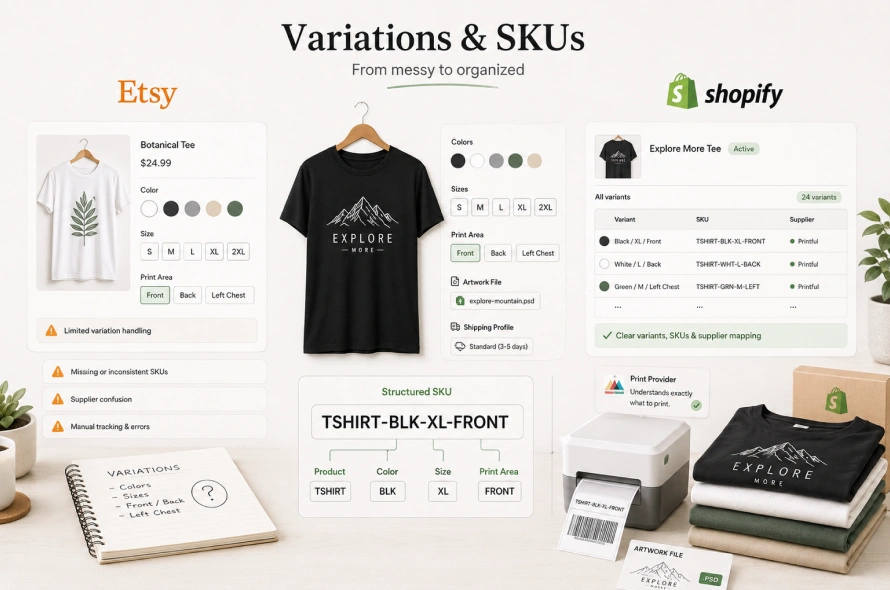
For print shops, product data is usually more complicated than it looks.
A simple t-shirt may have:
- 6 colors
- 7 sizes
- Multiple print areas
- Different production partners
- Different shipping profiles
- Different artwork files
On Etsy, these options may be managed in a simpler or more limited way. On Shopify, they need to be structured properly so customers can select the right product and your fulfillment system can process the order correctly.
The most common issue is missing or messy SKUs.
What is A SKU? SKU is a unique product code that helps your store and print provider understand exactly what product was ordered.
For example:
TSHIRT-BLK-XL-FRONT
This could mean:
- Product: T-shirt
- Color: Black
- Size: XL
- Print area: Front
If your SKUs are missing, duplicated, or poorly structured, your Shopify store may receive orders correctly, but your print provider may not know what to produce.
That is where many DIY migrations fail.
A proper Etsy to Shopify POD migration must include SKU planning before the store goes live.
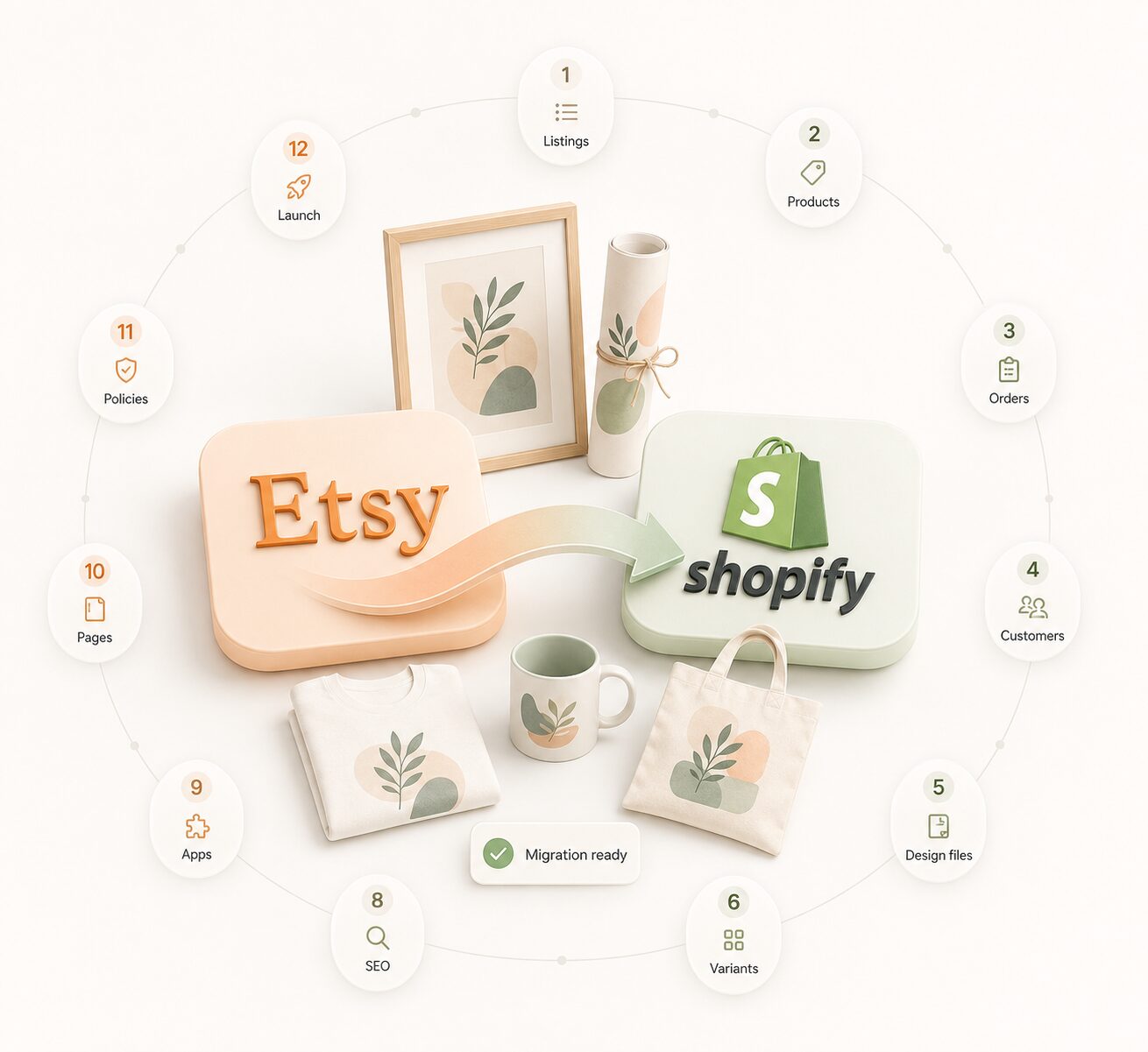
How to Migrate from Etsy to Shopify Step by Step
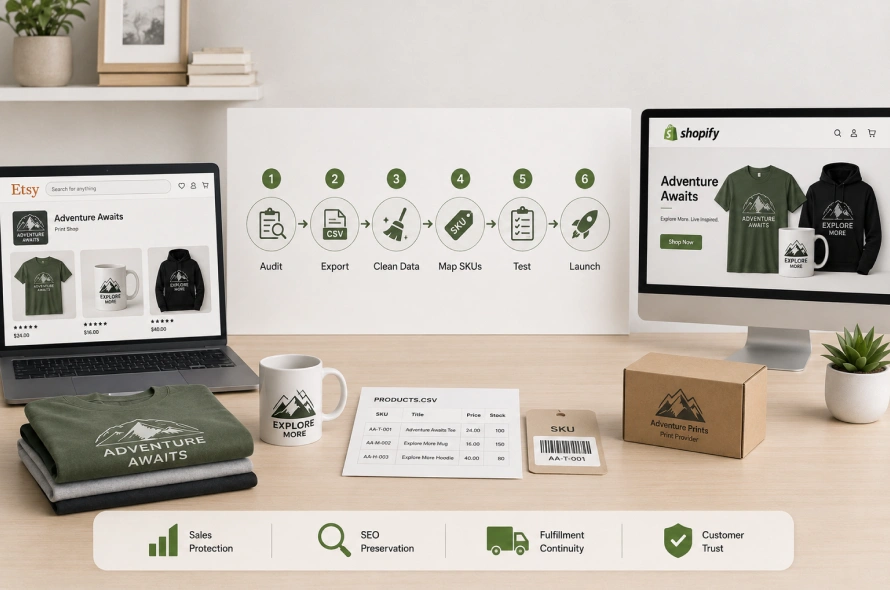
The migration process should be handled in a controlled way. Do not rush it. The goal is not only to move data. The goal is to move the business without breaking sales, SEO, fulfillment, or customer trust.
Step 1: Audit Your Etsy Store Before Exporting Anything
Before downloading files, review your current Etsy store.
Check:
- Best-selling products
- Products with strong organic traffic
- Products with reviews
- Products with many variations
- Products connected to print suppliers
- Products that are outdated or low quality
- Listings that should not be moved
Do not migrate everything blindly.
Migration is a good time to clean your catalog. Move the products that still matter, improve weak listings, and remove products that are not worth carrying forward.
This makes the new Shopify store cleaner, faster, and easier to manage.
Step 2: Export Your Etsy Listing Data
Etsy allows sellers to download listing information from the Shop Manager area.
The usual path is:
Shop Manager → Settings → Options → Download Data → Download CSV
This CSV file normally includes core listing data such as product titles, descriptions, pricing, quantity, tags, and image URLs.
But this file is not ready for Shopify yet.
Etsy’s CSV format is different from Shopify’s product import format. If you upload the raw Etsy file directly into Shopify, your products may import incorrectly or fail.
Step 3: Clean and Reformat the Product CSV
This is one of the most important parts of the migration.
Your Etsy CSV needs to be converted into Shopify’s product CSV format.
This usually includes:
- Renaming columns
- Cleaning product titles
- Rewriting descriptions where needed
- Formatting descriptions into Shopify-friendly HTML
- Separating product options
- Fixing image links
- Adding product types
- Adding vendors
- Adding tags
- Assigning collections
- Creating or fixing SKUs
- Checking prices and inventory
For example, Etsy may export a variation as one combined value like:
Black – XL
Shopify needs this separated into structured options like:
- Option 1 Name: Color
- Option 1 Value: Black
- Option 2 Name: Size
- Option 2 Value: XL
This structure makes the product page cleaner and helps Shopify manage variants properly.
Step 4: Build a Proper SKU System
If your products do not already have clean SKUs, create them before importing into Shopify.
A good SKU system should be:
- Clear
- Consistent
- Easy to read
- Unique for every variation
- Connected to your product and supplier workflow
Example SKU format:
HOODIE-NAVY-L-FRONT
Or:
MUG-WHITE-11OZ-FULLWRAP
Do not use random codes unless your fulfillment system already requires them.
For POD businesses, SKUs are not just internal labels. They are part of the automation system between Shopify, your print provider, and your fulfillment workflow.
Step 5: Import Products into Shopify
Once your CSV is cleaned and structured, import it into Shopify.
After import, manually check a sample of products before assuming everything is correct.
Review:
- Product title
- Product description
- Product images
- Variant dropdowns
- Price
- Compare-at price
- Inventory settings
- SKU
- Product type
- Tags
- Collections
- Mobile layout
- Add-to-cart behavior
Do not skip QA.
A migration can look successful in the admin but still create broken product pages on the storefront.
Step 6: Reconnect Your Print Providers
Your Etsy supplier connections will not automatically move to Shopify.
You need to reconnect apps such as:
- Printful
- Printify
- Gelato
- Gooten
- Custom local printers
- 3PL or fulfillment partners
After installing the correct Shopify apps, map imported products to the right supplier products.
This is where your SKU structure becomes important.
If SKUs are clean, supplier mapping becomes much easier. If SKUs are missing or messy, every product may need manual correction.
Also make sure to re-upload original high-resolution artwork files where needed. Do not rely only on compressed marketplace image links.
For print businesses, image quality directly affects final product quality.
Step 7: Rebuild Collections and Store Navigation
Your Shopify store should not just copy the Etsy structure. It should be easier to browse, easier to filter, and easier to buy from.
So, create collections based on how customers shop.
For example:
- Custom T-Shirts
- Hoodies
- Mugs
- Corporate Gifts
- Event Merchandise
- School Spirit Wear
- Team Apparel
- Best Sellers
- New Arrivals
For promotional distributors, you may also need client-specific or industry-specific collections.
For example:
- Healthcare Merchandise
- Real Estate Promotional Products
- Construction Company Apparel
- Corporate Welcome Kits
- Employee Gift Boxes
This makes the Shopify store feel more professional and helps buyers find the right products faster.
Step 8: Protect Your Organic Traffic with Redirects
This is where many Etsy to Shopify migrations go wrong.
If your Etsy listings receive traffic from Google, Pinterest, blogs, or social media, those old URLs matter.
When you move to Shopify, your product URLs will change. If you do not create redirects, visitors may land on broken pages or get lost.
Shopify allows URL redirects so you can send old traffic to the correct new page.
For example:
Old Etsy product URL → New Shopify product URL
This helps protect your SEO and gives customers a smoother experience. You should create a redirect map before launch. This map should include:
- Old Etsy listing URLs
- New Shopify product URLs
- Priority pages
- Best-selling products
- High-traffic products
- Collection pages
If you already have strong organic traffic, redirects are not optional. They are critical.
Step 9: Set Up Payments, Shipping, and Tax Rules
After products are imported, set up the business side of the Shopify store.
This includes:
- Shopify Payments
- PayPal
- Apple Pay
- Google Pay
- Shipping rates
- Shipping profiles
- Tax settings
- Order notifications
- Refund policy
- Privacy policy
- Terms of service
- Contact page
For print-on-demand businesses, shipping setup needs extra care.
Different suppliers may have different production times, shipping costs, and delivery zones. If you sell products from multiple suppliers, you may need separate shipping profiles.
For example:
- Apparel supplier shipping profile
- Mug supplier shipping profile
- Local printer shipping profile
- Bulk corporate order shipping profile
Wrong shipping setup can destroy your margins or create customer complaints.
Step 10: Import Customers and Order History Carefully
Customer and order migration from Etsy is not always straightforward.
You may be able to export sold order or transaction data, but you must handle it carefully. Customer communication must follow Etsy’s rules, privacy laws, and email marketing consent requirements.
Do not blindly upload past buyer emails into a marketing tool and start sending promotional campaigns.
A safer approach is:
- Import customer/order records for business history where appropriate
- Use compliant communication methods
- Announce the new store through allowed channels
- Add messaging inside current Etsy order communication where permitted
- Place a note in packaging for future buyers
- Invite customers to subscribe to your Shopify email list voluntarily
- Offer a launch discount for customers who join your new list
The goal is to bring your audience with you without creating privacy or compliance problems.
Step 11: Test the Full Buying and Fulfillment Flow
Before launch, place test orders.
Test:
- Product selection
- Variant selection
- Cart
- Discount code
- Checkout
- Payment
- Tax
- Shipping rate
- Order confirmation email
- Supplier order routing
- Print provider mapping
- Fulfillment status
- Tracking email
- Refund process
Do not launch until the full workflow works from customer purchase to production.
For print businesses, one broken supplier mapping can cause wrong products, wrong sizes, wrong colors, or missed orders.
Step 12: Launch Your Shopify Store and Announce the Move
Once the store is ready, announce the move clearly.
Your message should explain:
- Your shop has moved to a new official website
- Customers can now buy directly from your brand
- The new store has better product organization
- Checkout is faster
- New products or exclusive drops may be available
- Customers can join your email list for updates and discounts
Keep the announcement simple and benefit-focused.
Do not make it only about leaving Etsy. Make it about giving customers a better buying experience.
Why DIY Migration Is Risky for Print Shops
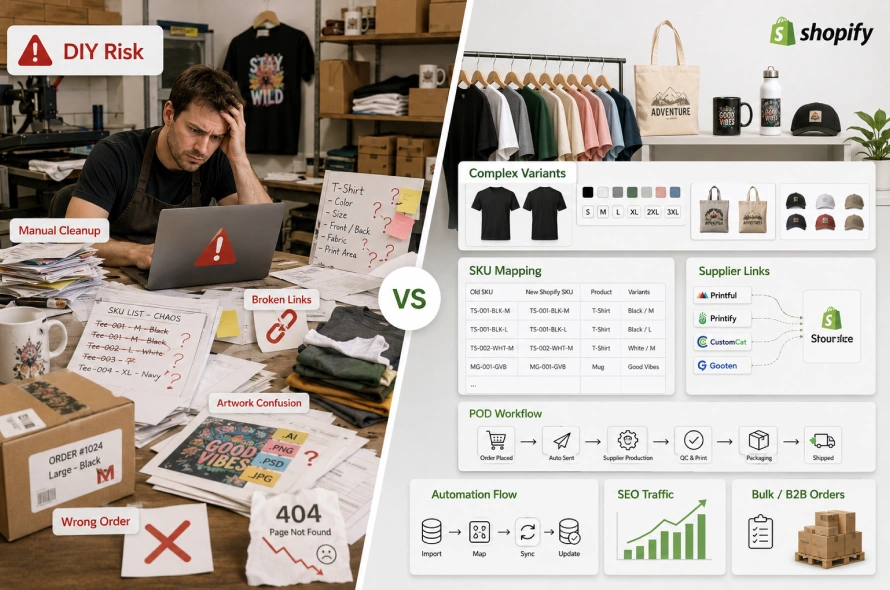
A basic Etsy to Shopify migration may sound simple, but print shops are rarely simple.
The real challenges are usually hidden inside product variations, SKU mapping, artwork files, supplier connections and automation workflows.
A DIY migration may work for a small store with 20 simple products.
But if you have hundreds of products, complex variants, POD suppliers, corporate clients, or existing organic traffic, DIY migration can create expensive problems.
You may save money upfront but lose more later through broken pages, wrong orders, lost SEO traffic, or manual cleanup.
Who Should Handle Your Etsy to Shopify Migration?

If your store is small and simple, you can migrate it yourself with careful planning.
But if your business depends on product accuracy, organic traffic, POD fulfillment, or repeat customers, you should work with a Shopify migration expert that understands both ecommerce and print operations.
You need a team that can handle:
- Etsy data export and cleanup
- Shopify CSV formatting
- Product and variant mapping
- SKU planning
- POD supplier reconnection
- Custom Shopify theme setup
- SEO redirect mapping
- Customer and order data handling
- Store QA
- Launch support
- Automation workflows
This is especially important for promotional product distributors managing multiple client stores or custom merch programs.
You are not just moving a website. You are moving a sales and fulfillment system.
Why Work with Swishtag for Etsy to Shopify POD Migration?
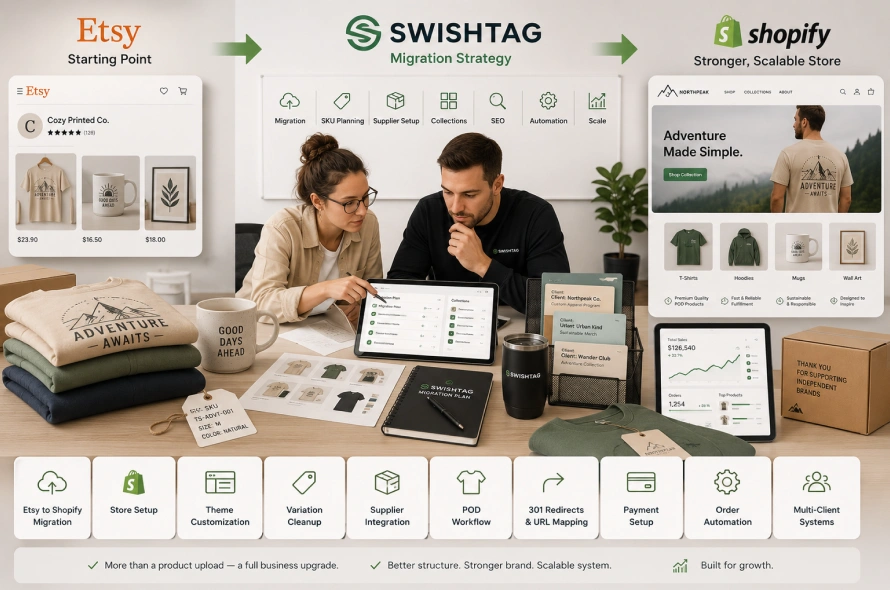
Swishtag helps print shops, POD brands, and promotional product distributors build scalable Shopify systems.
Swishtag does not only upload products from Etsy to Shopify. It helps structure the full migration properly so your store is ready to sell, fulfill, and scale.
Swishtag’s migration experts can help you with:
- Etsy to Shopify product migration
- Shopify store setup and theme customization
- Product variation cleanup
- SKU structure planning
- Printful, Printify, and supplier integration
- Custom POD workflow setup
- SEO redirect mapping
- Collection and navigation setup
- Checkout and payment configuration
- Order automation
- Multi-client store systems
- Shopify custom development
If you are moving from Etsy because your business has outgrown marketplace limitations, your Shopify store should not be a basic copy of your Etsy shop.
It should be a stronger, cleaner, more scalable ecommerce system.
That is the difference between a simple migration and a proper business upgrade.
Frequently Asked Questions
Can I migrate my Etsy products to Shopify?
Yes. You can export your Etsy listing data and convert it into Shopify’s product format. However, the data usually needs cleanup before import, especially if your products have variations, images, tags, or print-on-demand supplier connections.
Will my Etsy product variations move correctly to Shopify?
Some variation data may transfer, but it often needs restructuring. Shopify uses its own product option and variant format, so size, color, material, and other options should be cleaned and mapped properly before import.
Can I move Etsy reviews to Shopify?
Etsy reviews do not move through the standard product CSV export. Depending on your situation, you may need an approved review app, manual review handling, or a custom migration approach where allowed. This should be handled carefully to avoid misleading customers or violating platform rules.
Will I lose my Google rankings after moving from Etsy to Shopify?
You can lose organic traffic if the migration is done poorly. To protect SEO, you should map old product URLs to new Shopify URLs and create proper redirects. You should also optimize product titles, descriptions, collections, meta titles, and meta descriptions on the new store.
Can I connect Printful or Printify after migration?
Yes. You can connect Shopify with Printful, Printify, and other print providers. But your products need proper SKUs, variants, and supplier mapping so orders route correctly after checkout.
Can I contact my old Etsy customers after moving to Shopify?
You need to be careful. Customer communication must follow Etsy’s policies, privacy laws, and marketing consent rules. The safer approach is to invite customers to join your new email list voluntarily and announce your new store through compliant methods.
Is Shopify better than Etsy for print shops?
Shopify is better if you want more control, stronger branding, better automation, direct customer relationships, and scalable ecommerce operations. Etsy can still be useful as a sales channel, but Shopify is stronger as your main brand-owned store.
Etsy Is a Marketplace, Shopify Is Your Own Business Infrastructure
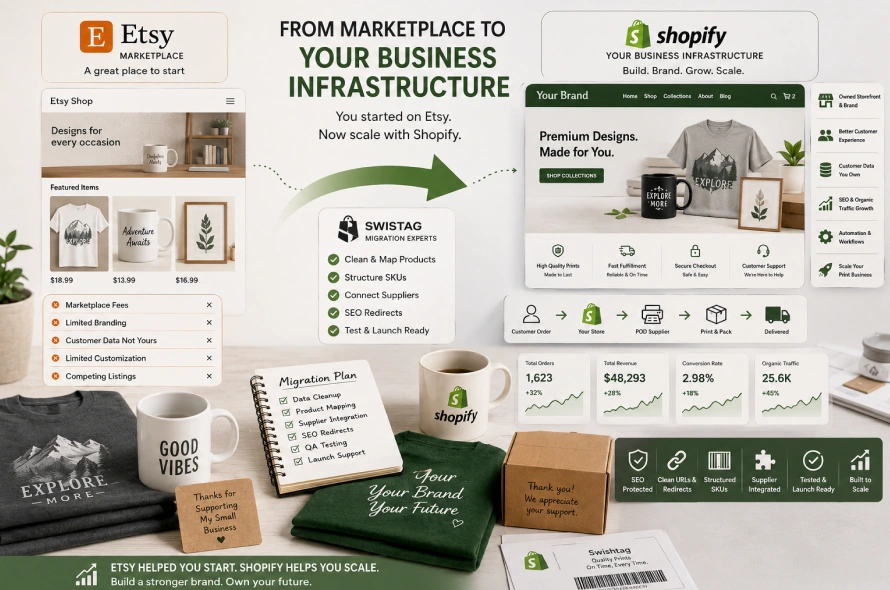
Moving from Etsy to Shopify is not just a platform change.
It is a business decision.
Etsy can help you start selling, but Shopify helps you build a brand you control. With Shopify, you can own your storefront, improve your customer journey, build direct relationships, automate fulfillment, protect your SEO, and create a more scalable print business.
But the migration must be done properly.
Your products need to be cleaned and mapped. Your SKUs need to be structured. Your POD suppliers need to be reconnected. Your redirects need to be planned. Your store needs to be tested before launch.
If your Etsy shop has only a few simple products, you may be able to handle the move yourself.
But if you run a serious print shop, POD brand, or promotional products business, you should not risk a broken migration.
Work with a Shopify migration team that understands print-on-demand workflows, product data, supplier integrations, SEO, and ecommerce automation.
Swishtag can help you migrate from Etsy to Shopify the right way, without losing control of your products, customers, fulfillment process, or organic growth.
Your Etsy store helped you start. Your Shopify store can help you scale.