
Squarespace is a good platform for simple websites. If you need a basic online presence, a portfolio, or a small ecommerce store with a few products, they can work well.
A print shop needs more than a beautiful homepage. It needs product options, size, color variants, custom artwork handling, quote requests, print file uploads, shipping rules, supplier workflows, order automation, and a clean buying experience.
This is where many print shops start feeling stuck.
This guide explains the real difference between Squarespace Vs Shopify for custom print shops, why migration makes sense, how the migration process works, and who should handle it.
You might be interested in:
Migrate WooCommerce Print Shop to Shopify with 5 Steps
Etsy to Shopify Migration – Move Your Print Shop in 12 Steps
Squarespace Website May Look Good, But the Business Behind it Becomes Harder to Manage.

In print on demands business, merchandise products become messy. Customers ask for custom orders manually. Therefore, staff handle too many details through email.
In squarespace, fulfillment is not connected properly due to lack of automation system between supplier and decorator. SEO traffic is hard to protect. The store starts acting like a brochure, not a real ecommerce system.
That is why many custom print shops, print-on-demand brands, and promotional product distributors move from Squarespace to more stable and scalable platforms like Shopify.
Squarespace vs Shopify for Custom Print Shops: What’s the Main Difference?
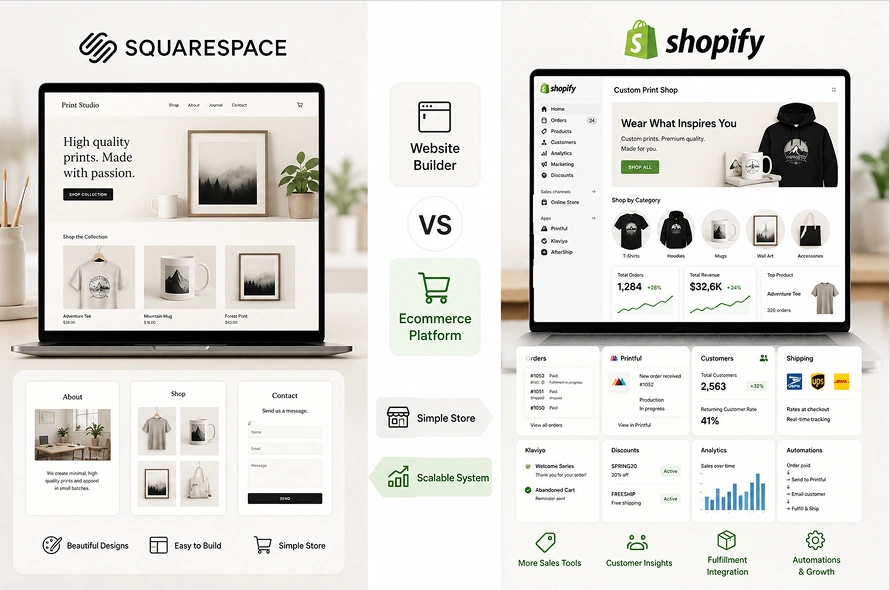
The main difference is simple. Squarespace is mainly a website builder with ecommerce features. Shopify is an ecommerce platform with website-building features.
That difference matters a lot for print shops.
Squarespace is strong when you need a clean design, simple pages, and a basic online store. It is good for photographers, consultants, restaurants, portfolios, and small brands that do not need complex selling workflows.
Shopify is stronger when your business depends on selling products, managing orders, connecting apps, handling customer data, and scaling operations.
For a custom print shop, ecommerce is not a side feature. It is the core of the business.
That is why Shopify usually becomes the better long-term choice.
We have a made a detailed woocommerce Vs Shopify and how to migrate your print shop from WooCommerce to Shopify in just 5 steps
Why Custom Print Shops (POD) Move to Shopify

Print businesses move to Shopify for practical reasons, not just because Shopify is popular. The real reasons are operational.
1. Better Product Variant Management
Print products often need many options. For example, a custom hoodie may include:
- Size
- Color
- Print location
- Quantity
- Artwork upload
- Personalization text
- Delivery method
On a basic website builder, these options can become messy.
But Shopify handles product options and variants more naturally. It also supports apps and custom development when a product needs advanced options beyond standard variants.
This is important for print shops because one wrong option can create a wrong order.
If a customer selects black, large, front print, and 50 quantities, the store needs to pass that information clearly to your team or supplier.
2. Stronger App Ecosystem
Shopify has a large app ecosystem for ecommerce workflows. A print shop may need apps for:
- Product customization
- File upload
- Print-on-demand fulfillment
- Product reviews
- Email marketing
- Subscriptions
- Bundles
- Discounts
- Shipping rates
- Order tagging
- Wholesale pricing
- B2B pricing
- SEO
- Analytics
Squarespace also has integrations, but Shopify’s ecosystem is much stronger for ecommerce-specific operations.
For a growing print shop, this matters because you do not want to rebuild everything from scratch.
3. Better Checkout Experience
Checkout is where money is made or lost.
Shopify gives a smoother ecommerce checkout experience, better payment options, better abandoned cart recovery options, and more ecommerce-focused controls.
For print shops, this becomes important when customers are ordering multiple products, using discount codes, buying in bulk, or coming from ads.
A weak checkout can kill conversions.
4. Easier Fulfillment and POD Integration
Many print shops use tools like:
- Printful
- Printify
- Gelato
- Gooten
- ShipStation
- Custom local printers
- 3PL partners
- ERP systems
Shopify connects better with these ecommerce and fulfillment workflows.
For print-on-demand and promotional products businesses, this is a major advantage.
You can automate order routing, supplier mapping, tracking updates, customer emails, and fulfillment status.
That means fewer manual steps and fewer mistakes.
5. Better for B2B and Bulk Orders
Many custom print shops sell to businesses, schools, teams, events, and organizations.
These buyers often need:
- Bulk pricing
- Quote requests
- Repeat orders
- Custom catalogs
- Client-specific products
- Minimum order quantities
- Approval workflows
- Corporate payment methods
Shopify gives more room to build these workflows through apps, custom development, or Shopify Plus if the business becomes larger.
Squarespace and Wix are not built for complex B2B print operations.
How to Migrate from Squarespace to Shopify

A good migration should follow a controlled process. The goal is not just to move the store. The goal is to improve the store.
Step 1: Audit Your Current Website
Start by reviewing the current Squarespace site. Check your:
- Best-selling products
- Pages ranking on Google
- Product categories
- Product variants
- Custom order forms
- Quote request forms
- Customer data
- Order history
- Existing integrations
Do not move everything blindly.
Some pages may be outdated. Some products may not sell. Some product descriptions may be weak. Some categories may confuse customers.
Step 2: Plan the Shopify Store Structure
Before importing data, plan the new Shopify structure. This includes:
- Main navigation
- Collections
- Product types
- Tags
- Product templates
- Custom fields
- Upload fields
- Quote forms
- Size charts
- Bulk order logic
- Shipping profiles
- Payment options
- SEO structure
For a custom print shop, collections should be built around how customers buy.
Examples:
- Custom T-Shirts
- Custom Hoodies
- Embroidered Hats
- Mugs
- Signs and Banners
- Corporate Gifts
- School Apparel
- Event Merchandise
- Team Uniforms
- Promotional Products
- Best Sellers
For promotional product distributors, you may also need industry-based collections:
- Healthcare Promotional Products
- Real Estate Gifts
- Construction Company Apparel
- Corporate Welcome Kits
- Employee Onboarding Gifts
A better structure makes the store easier to browse and easier to rank.
Step 3: Export Product Data
From Squarespace, export available product data where possible. This usually gives you a CSV file with product information. But this file is not ready for Shopify yet.
Every platform has a different CSV format. The export file needs to be converted into Shopify’s product import format.
This is where many DIY migrations go wrong.
If the CSV is not prepared correctly, products may import with broken images, missing variants, wrong prices, poor formatting, or incomplete data.
Step 4: Clean and Reformat the CSV for Shopify
This step is very important. The product data should be reviewed and cleaned before import.
This may include:
- Cleaning product titles
- Improving product descriptions
- Fixing image URLs
- Rebuilding product options
- Creating Shopify collections
- Adding product tags
- Adding product types
- Adding vendor names
- Fixing prices
- Creating SKUs
- Mapping variants
- Removing duplicate products
For example, if your current product option is written like this:
Black / XL / Front Print
Shopify may need this separated into proper fields:
- Option 1 Name: Color
- Option 1 Value: Black
- Option 2 Name: Size
- Option 2 Value: XL
- Custom field: Print Location, Front Print
This makes the product easier for customers to use and easier for your team to process.
Step 5: Build a Proper SKU System
SKUs matter a lot for print shops. A SKU tells your store, team, or supplier exactly what product was ordered.
Example:
TSHIRT-BLK-XL-FRONT
This could mean:
- Product: T-shirt
- Color: Black
- Size: XL
- Print area: Front
Another example:
MUG-WHT-11OZ-FULLWRAP
This could mean:
- Product: Mug
- Color: White
- Size: 11 oz
- Print style: Full wrap
If your current Squarespace store does not have clean SKUs, fix this before moving to Shopify.
Step 6: Import Products into Shopify
After the CSV is cleaned, import products into Shopify. Then check the product’s details manually like product titles, descriptions, images, prices, variants, SKUs & tags etc.
Do not assume the import is perfect.
A store can look fine in the admin but still create problems on the frontend.
Step 7: Rebuild Custom Product Options
This is one of the most important steps for print shops.Shopify’s standard product options may be enough for simple products, but custom print shops often need more details like:
- Artwork upload field
- Custom text field
- Logo placement option
- Print location selector
- Quantity-based pricing
- Setup fee logic
- Proof approval checkbox
- Quote request button
- Bulk order form
- Custom product builder
- Live product preview
- Personalization options
These can be handled through apps or custom Shopify app development.
For simple stores, an app may be enough but, for serious print shops, a custom workflow may be better because it can match your exact production process.
Step 8: Reconnect Print Providers and Fulfillment Tools
Your Squarespace integrations will not automatically move to Shopify. You need to reconnect the tools that power your business.
These tools may include:
- Printful
- Printify
- Gelato
- ShipStation
- Klaviyo
- Google Analytics
- Meta Pixel
- Google Merchant Center
- Email marketing tools
- Local printer workflows
- ERP or CRM systems
After reconnecting, test everything.
A product should not only appear on the website. It should flow correctly from checkout to production.
Step 9: Set Up Payments, Shipping, and Taxes
After products are imported, configure the business settings.
Set up:
- Payment gateways
- Shipping rates
- Shipping profiles
- Tax settings
- Order notifications
- Refund policy
- Privacy policy
- Terms of service
- Contact page
Print shops need extra care with shipping.
Different products may have different production times and shipping costs.
For example:
- T-shirts may ship from one supplier
- Mugs may ship from another supplier
- Bulk corporate orders may need manual shipping quotes
- Local pickup may apply for nearby customers
- Rush orders may need a separate fee
If shipping is wrong, margins can suffer quickly.
Step 11: Launch and Announce the New Store
Once everything is set up & tested, then launch the Shopify store with full pace.Your message should explain:
- You have moved to a new official store
- Customers can order more easily
- Product options are cleaner
- Checkout is faster
- Custom orders are easier to submit
- New products or bulk options are available
Do not make the message only about leaving Squarespace.
What Can Be Migrated from Squarespace to Shopify?

Squarespace and Shopify store data differently. That means product data usually needs cleanup before it can work properly inside Shopify.
Here is what can usually be moved:
| Data Type | Can It Move? | What Needs Attention |
| Product titles | Yes | Titles may need cleanup for SEO and clarity |
| Product descriptions | Yes | Formatting may need adjustment |
| Product images | Usually yes | Image quality and file links must be checked |
| Product prices | Yes | Compare-at prices and discount logic may need review |
| Product variants | Partial | Size, color, material, and print options may need restructuring |
| SKUs | Yes, if available | Missing or messy SKUs should be fixed |
| Categories | Partial | Shopify collections may need to be rebuilt |
| Customer data | Usually possible, depending on export | Marketing consent must be handled carefully |
| Order history | Sometimes possible | May require custom import or app support |
| Blog posts | Partial | Formatting and URLs may need cleanup |
| Pages | Manual or partial | Important pages should be rebuilt properly |
| SEO URLs | No direct match | Redirect mapping is required |
| Reviews | Depends on setup | May require app-based or manual handling |
| Custom forms | No direct match | Forms need to be rebuilt in Shopify |
| Print provider connections | No | Suppliers must be reconnected and tested |
The key point is this:
Your data can move, but your ecommerce workflow needs to be rebuilt properly.
Why DIY Migration Is Risky for Print Shops

A small store with a few simple products can be moved manually.But a custom print shop is different. The risk is not only losing data. The real risks are:
- Broken product options
- Missing custom fields
- Wrong SKUs
- Lost product images
- Confusing checkout
- Disconnected print providers
- Wrong shipping rules
- Missing order details
A DIY migration may look cheaper at first, but it can cost more later. If customers cannot order correctly, the store is not ready.
Who Should Handle Your Migration?

If your print shop is simple, you may be able to migrate yourself. But if your store has custom products, many variants, print provider integrations, or bulk order workflows, you should work with a Shopify migration team.
You need a team that understands both ecommerce and print operations.
The team should clearly understand the difference between Squarespace Vs Shopify and be able to handle:
- Squarespace to Shopify migration
- Product CSV cleanup
- Variant mapping
- SKU planning
- Custom product options
- Artwork upload workflows
- Printful or Printify setup
Because, a print shop migration is not only a website task. It is a business operations task.
Why Work with Swishtag?

Swishtag helps custom print shops, print-on-demand brands, and promotional product distributors move to Shopify the right way.
It does not just copy products from one platform to another. It helps structure the full ecommerce system so your store is easier to manage, easier to sell from, and easier to scale.
Swishtag can help with:
- Squarespace to Shopify migration
- Shopify store setup
- Custom Shopify theme development
- Product and variant cleanup
- SKU structure planning
- Product personalization features
- Artwork upload setup (Product Customizer with real time Visualizer)
- Print provider integration
- POD workflow automation
- Shopify custom apps
- Multi-store systems for promotional distributors
If your current website is holding back your print shop, moving to Shopify is not just a design upgrade.
It is a business upgrade.
Frequently Asked Question
Is Shopify better than Squarespace for custom print shops?
Yes, in most serious ecommerce cases. Squarespace can work for simple websites, but Shopify is better for product management, checkout, apps, fulfillment workflows, customer data, and ecommerce growth.
Is Shopify better than Wix for print-on-demand?
Shopify is usually better for print-on-demand because it has stronger ecommerce tools, more POD integrations, better checkout, and more flexibility for product workflows.
Can I migrate products from Squarespace to Shopify?
Yes. Product data can usually be exported and converted into Shopify’s product format. However, the data often needs cleanup before import, especially if products have variants, images, SKUs, or custom options.
Will I lose SEO traffic after moving to Shopify?
You can lose traffic if the migration is done poorly. To protect SEO, you need a redirect map from old URLs to new Shopify URLs. Important product pages, service pages, and blog posts should be redirected properly.
Can Shopify handle custom product options?
Yes. Shopify can handle standard product options and variants. For advanced custom print features like file uploads, personalization, bulk pricing, or live previews, you may need apps or custom development.
Can I connect Printful or Printify with Shopify?
Yes. Shopify works well with Printful, Printify, Gelato, and other print-on-demand tools. But products, SKUs, and variants should be mapped properly so orders are routed correctly.
Should I keep Squarespace or Wix and just add Shopify buttons?
That can work for very small stores, but it is not ideal for a serious print business. If ecommerce is central to your business, it is better to build the full store on Shopify instead of splitting the experience across platforms.
Squarespace Help You Start, Shopify Helps You Scale

Squarespace isn’t a bad platforms. It is useful for simple websites and small stores. But custom print shops need more than a good-looking site. They need a system that can handle products, options, files, orders, shipping, fulfillment, SEO, and growth.
That is where Shopify becomes the stronger choice.
If your print shop is still small, Squarespace or Wix may be enough for now.
But if you are managing custom products, print-on-demand workflows, bulk orders, supplier integrations, or serious ecommerce traffic, moving to Shopify gives you more control over your store, your products, your customer experience, and your operations.
Swishtag can help you move from Squarespace to Shopify without turning the migration into a mess.